www.IRC-Junkie.org – IRC News

All about Internet Relay Chat

HowTo: IRC anonymously with TOR

On networks that don’t hide your IP or hostname automatically on connect, your IP is exposed for everyone to see and possibly abuse.

Also there are many reasons you might not want to show everyone from what point of the world you are connecting from and/or want to add a little more anonymonity to your online activities.

You can do so by connecting to IRC via TOR – dubbed “The Onion Router” – how exactly that works and is set up is shown in a small tutorial video we’ve put online.

In this video we’ve used a virtual machine running Ubuntu “Karmic Koala” and the IRC-client XChat for our setup – but the same principles apply to any other client or operating systems, although the steps you need to take will differ.

Watching the video in HD for better readability of the on-screen instructions etc. is recommended.

Questions? Comments? Let us know :)

lightIRC flash webchat releases 0.9.6

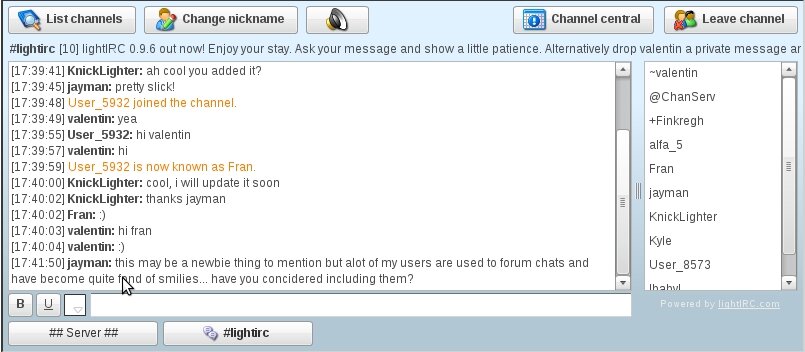
lightIRC, the “fast, free, flash-based IRC client written in ActionScript 3″ just released version 0.9.6 of their embeddable webchat.

Quoting their webpage, “lightIRC supports channels, queries, a lot of IRC commands, some CTCP commands and is much customizable through StyleSheets” and also has “multi language support” as well as a “nice GUI to set kicks, bans and channel modes”.

lightIRC Webinterface

lightIRC Webinterface

Since this version, lightIRC got a webcam feature which uses the Red5 streaming server as its backend, though thats currently only available on their IRCd – but you can contact the author if “you are interested in purchasing the webcam extension for your IRC network”.

The complete changelog reads as follows:

  • Added buttons and icons for a better user experience. If you do not like it, the old lightIRC GUI can be restored with showNavigationBar = “no” and showActionsButton = “yes”
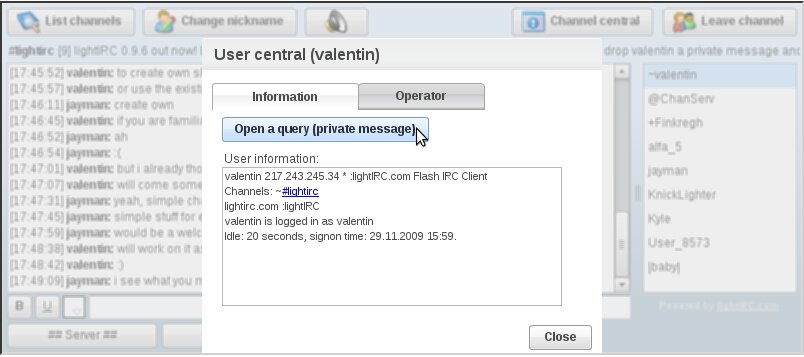
  • Right-click menu for the user list offers features to ignore/kick/ban/op/query users with one click
  • The commands /ignore nick, /unignore nick, /ignores make you able to mute people
  • Added translations for Dutch (nl), Swedish (se), Finnish (fi), Romanian (ro), Estonian (ee), Serbian Cyrillic (sr_cyr) and Serbian Latin (sr_lat)
  • Clicking a nickname in the chat area selects that user in the user list
  • Commands can be put into the parameter “perform” and will be executed on connect. Example: “/mode nick +x,/msg nick2 hello”
  • User list does not scroll to top anymore if a user joins or parts
  • Refactored user list sorting algorithm again (much faster in channels with many users and lots of joins/parts)
  • User list in channels is now draggable and can therefore be resized. Initial width can be set through userListWidth to any value >= 130 or 0 to hide the user list completely
  • Font color resets automatically to default if +c is set in a channel
  • Parameter “fontSize” lets you adjust how large fonts in text input and chat area should be displayed. It defaults to 12px
  • Changed the parameter infoLineColorCode to infoLineColor that takes now RGB values: default is #fc7f00
  • New sound for message alert
  • Parameter “doubleClickForQuery” (default: “no”) disables the user central and opens a query upon doubleclicking a nickname
  • Fix: Topic overflows the available space
  • Fix: When using /msg #channel or /msg nick the message will not be displayed to the chat area
lightIRC userlist popup

lightIRC userlist popup

You can find the download here.

Free IRC bouncer provider test

So you want to have a bouncer to stay connected on your favourite IRC network, hide your IP from hackers and the likes and all that without paying a single cent? Look no further, below we have gathered a few providers of such free BNCs and put them to a test – of course without them knowing :)

Note that we’ve only tested providers that require no sign-up for dubious services and provide bouncers which are free to use on any network and not only on the one where they have their support-channel – some however ask you to idle there and might cancel your BNC if they find you to not comply with this.

The providers tested (in no special order) are:

BNC4Free

Signup: on IRC

Time to setup: 9h

VHosts: none

Other: Webpanel

LobbyZNC Doesn’t exist any longer

Signup: on Website

Time to setup: 15m

vHosts: none

Other: Webpanel

NinjaBounce No longer appears to be free

Signup: per eMail

Time to setup: 1h

vHosts: 20+

During the test period all bouncers have been incredibly stable and didn’t drop the connection a single time – there was just one planned maintenance downtime from BNC4Free which has been announced beforehand via eMail – that’s more than you can expect from a service you didn’t have to pay anything for.

All of the tested bouncer providers use ZNC as their software backend which is flexible, easy to use and stable and some of them even allow you to use a web frontend to configure your BNC.

Even though they provide you the service for free, most providers are happy to accept a donation if you appreciate their service so don’t just be a leech ;)

In conclusion i have to say that the results have been far better than expected and all services are worth what you paid for worth recommending if you ever need a bouncer but don’t have the resources to run one yourself.

So, what is your experience with free bouncers? Did they hold up to your expectations and demands?

  Copyright secured by Digiprove

Mibbit webchat updates

Mibbit, the popular webchat client for IRC, once again made a few updates to their service.

In the announcement they write that, due their tremendous growth, have “expanded from having a single backend for Widgets, to having 4 backend servers” which “also gives us failover, and an easy way to update backends without having to kick everyone off”.

Since all backends use the same IP, IRC networks that use Mibbit for their webchat don’t have to change anything.

The new features that were introduced with this update is WebSocket support, a feature currently only available in Google Chrome:

WebSocket is a system that allows a bidirectional tcp connection between browser and server. Mibbit can use this in place of Comet, in order to cut bandwidth and provide a faster experience for users. WebSocket is currently supported in latest Chrome dev channel. If you haven’t tried it yet, Chrome is an awesome webbrowser, especially for webapps like Mibbit.

Also, a lag-meter has been built in which “shows the current lag between your browser and the mibbit server” and even though this doesn’t measure the lag from mibbit to the IRC network they “plan to implement some lag features for IRC later on.” The lag is “logged on the Mibbit server in order for us to improve the user experience” and “if we find that lag from browsers in the UK is high, we may setup a UK backend”.

Closing the announcement they write

Once again, thanks for your understanding when we do have to restart a backend, we’re nearing a time now where we can do complete rolling updates and not have to kick anyone off.

It’s a real privilege to work on something that is used by so many people, and we really do appreciate your use of Mibbit. If you have any thoughts, ideas or gripes, please do feel free to catch me on irc.mibbit.net.

Happy holidays Mibbitians! :D

Happy holidays from here too =)