
PowerToys 0.102 releases 6 important new features, from blocking mouse drag to dictating while cropping the screen
The Microsoft development team has released the version 0.102 from PowerToys. Surely you know that this is a package of tools that contribute a lot to the operating system. In fact, we dedicate a complete guide to it in which, in addition to talking about its integrated tools, we explain how to install it on your PC.
Well, in this new version there are six main new features ranging from new cursor utilities to advanced console automation options. Additionally, the update continues the modernization of the project by moving more old modules to the WinUI 3 interface.
The new version of PowerToys comes with superpowers for your mouse and keyboard
PowerToys 0.102 releases two tools designed to improve the use of the mouse. It is about Mouse Button Lock and CursorHide. The first allows you to hold down any mouse button for a moment so that the system considers it pressed continuously after releasing it, facilitating extensive selections or prolonged dragging in editing programs and games until you click again.
For its part, CursorHide is responsible for automatically hiding the pointer on the screen while the user writes or when a period of inactivity passes, making it reappear as soon as it detects physical movement.
But there is also a dose of new features for the keyboard. The module Keyboard Manager It also receives one of the most requested improvements with the arrival of single press remaps. Thanks to this, a key can perform a secondary function when pressed and released in isolation, retaining its original behavior when part of a combination with shortcuts or mouse buttons.
Likewise, the new editor incorporates filters by application, a selector with a search engine to assign multimedia or missing keys on the physical keyboard and support for exporting profiles through DSC v3.
Capture with dictation in ZoomIt and quick shelf in Command Palette
In another order of things, the tool ZoomIt takes a leap by incorporating voice transcription during screenshots. By enabling the corresponding option in settings, simply hold down the space bar while selecting an area to describe what is being cropped.
The system processes audio locally on the device through the configured microphone, allowing a single paste action to simultaneously insert both the captured image and dictated text. Without a doubt, a very useful addition for those of us who constantly take screenshots.
On the other hand, the Command Palette adds an integrated quick access shelf in its compact mode, accessible from the appearance options. This tray places pinned items directly below the search box and allows them to be executed using the Alt+1 to Alt+9 combinations.
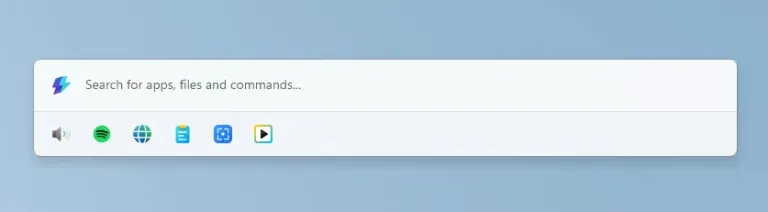
The palette also adds fuzzy search in the settings, integration with the Copilot physical key to open the interface, full keyboard scrolling in the dock with Win + Alt + J and support for pinning multiple clocks with independent time zones.
The icing on the cake is automation
The news continues for the development and administration environments. Command line tools designed to control PowerToys through scripts arrive. Modules like Advanced Paste, light switch and Peek now support terminal execution to process text, manage system themes with structured output in JSON format, or inspect multiple files.
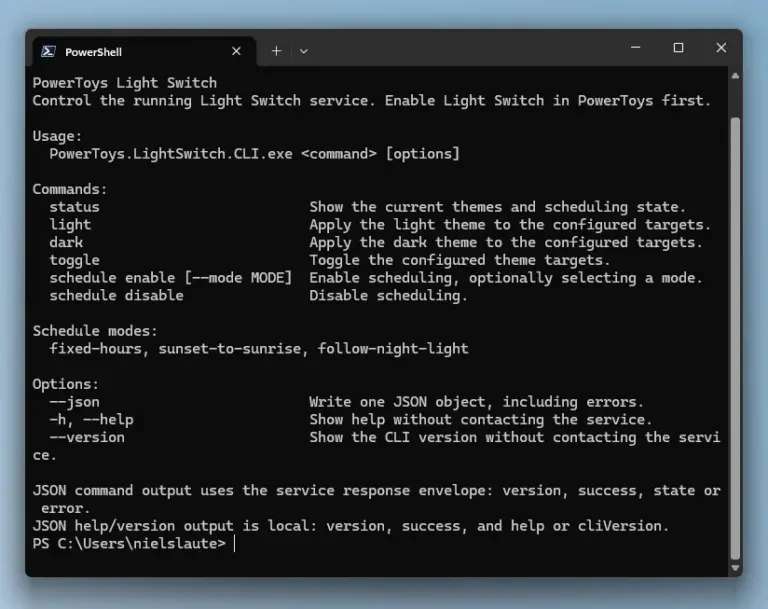
Likewise, the user can check which utilities are active and modify their status using commands, even if the PowerToys graphical interface is not running, adding direct integration into the PATH of commands such as FancyZones, Image Resizer and File Locksmith.
To finish, and as we noted at the beginning, Color Picker and Text Extractor have completed their migration to WinUI 3incorporating a renewed magnifying glass selector and keeping the pre-update shortcuts intact. You can download PowerToys from the Microsoft Store and get updates through that same channel.
