

There is a malware campaign that impersonates Teams, Zoom and Adobe
The Microsoft Defender security team has documented a series of phishing campaigns active during February 2026 that use a particularly sophisticated method to deceive both users and corporate protection systems themselves. The malware not only imitates the appearance of legitimate applications such as Microsoft Teams, Zoom, Google Meet or Adobe Reader, but carries a valid digital signatureallowing you to go unnoticed by many automated security checks.
Digital signatures are a trust mechanism that operating systems and antiviruses use to verify that a program comes from who it claims to come from. When an executable file is signed, Windows treats it with less suspicion. In this case, the attackers obtained an Extended Validation type certificatea category of certificate that involves a more thorough verification of the applicant’s identity, issued in the name of an entity called TrustConnect Software PTY LTD. With that certificate, any file they signed inherited an appearance of legitimacy that was difficult to distinguish from the real thing.
How deception works, step by step
The identified campaigns follow two main patterns. In the first, the victim receives an email with a PDF file attached. When you open it, instead of a document, a blurry image appears that simulates a restricted file, with a red button inviting you to open it in Adobe. Upon clicking, the user is redirected to a web page that imitates Adobe’s official download center and which automatically begins downloading what appears to be an Adobe Reader update. It is actually a remote access software package.
The second pattern uses emails that simulate invitations to Teams or Zoom meetings, financial notifications or internal company communications. The included links lead to fake pages that display “outdated version” or “update required” messages, designed to create urgency and get the user to download the file without thinking too much.
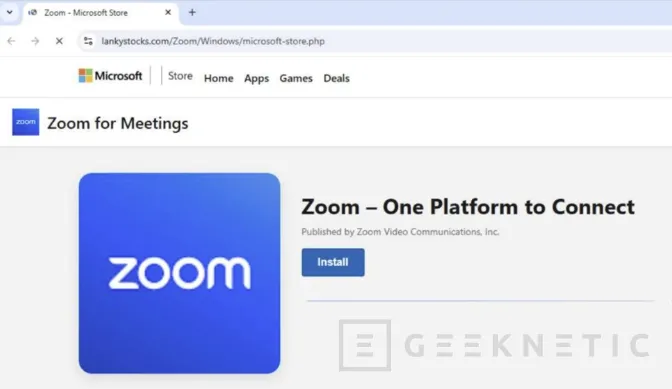
In both cases, the downloaded files have names like msteams.exe, zoomworkspace.clientsetup.exe either adobereader.exeand are signed by TrustConnect. Once executed, they install remote monitoring and management tools, known in the industry as RMM, specifically ScreenConnect, Tactical RMM and Mesh Agent. These tools, legitimate in corporate contexts, allow the attacker to silently and persistently take control of the infected computer.
Why is it an especially difficult attack to detect?
What makes this campaign more dangerous than conventional phishing is precisely the combination of elements of trust it accumulates. A valid digital certificate, file names that match real software, download pages that closely mimic official ones, and email messages that replicate the format of legitimate corporate communications. Each layer adds credibility and reduces the likelihood that the user or security system will raise an alert.
Once installed, the malware creates a copy of itself on the Program Files folder To reinforce its appearance as a legitimate application, it registers as a Windows service to run automatically at system startup and establishes a connection to servers controlled by the attackers. To ensure that access is maintained even if one of the tools is detected and removed, attackers install several of them in parallel, creating redundant access channels.
For IT teams, Microsoft recommends Block the use of unauthorized RMM tools through application policiesactivate Microsoft Defender cloud protection, and enable Safe Links and Safe Attachments features in Microsoft Defender for Office 365. It is also advisable to actively search corporate environments for installations of software signed by TrustConnect Software PTY LTD, which is the clearest indicator of compromise in this campaign. Advanced search queries for Microsoft Defender XDR and Microsoft Sentinel are available in the white paper published by the Microsoft Defender team.
The primary domain used as a control server by the attackers is trustconnectsoftware(.)com, and Microsoft has published a complete list of SHA-256 hashes, URLs, and IP addresses associated with the campaign to make it easier to block in enterprise environments.
