
This is what happens when you click on the Windows 11 desktop after installing the latest Bing Wallpaper update
The application Bing Wallpaper from Microsoft, an optional but official tool, has just been updated. In case you didn’t know, it is used to have daily wallpapers with high-resolution photographs in Windows 11. Although the idea may be attractive, in its latest version it has begun to behave unethically.
As revealed by the specialized media Windows Latestclicking on any free space on the desktop while the app is installed causes the system to automatically open the Bing website in the computer’s default browser. Wow, it has become textbook adware.
It must be clarified that this behavior does not occur continuously throughout the day. As confirmed by the sources consulted, it seems to be programmed with an activation frequency limited to once every 24 hours. After that first daily interaction that the browser launches, even if the user has Google Chrome or another alternative configured as the default program, the desktop responds normally again to new keystrokes until the next day.
The option to deactivate automatic opening disappears
It is not the first time that the Redmond company has experimented with a similar mechanism in this same utility. During the fall of 2025, the application already incorporated this redirection during a test deployment. However, in that version the settings interface included a specific switch that allowed you to disable the feature. However, in this latest version, this selector has completely disappeared from the settings panel.
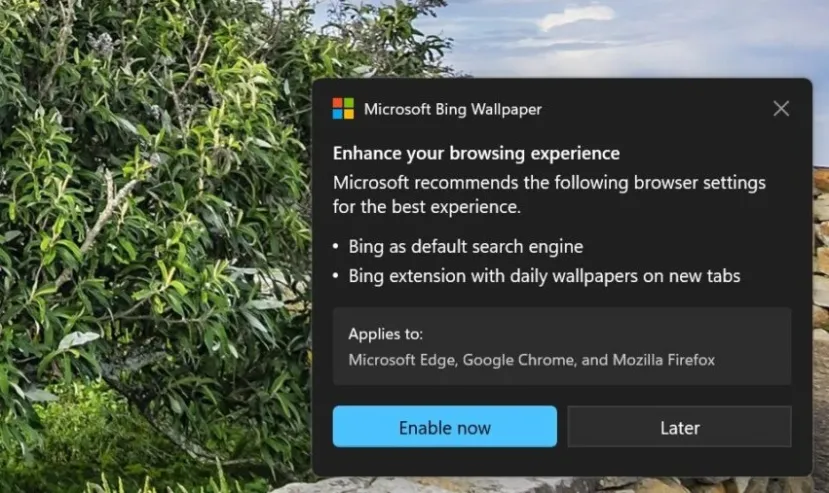
Added to this is that the application also shows pop-up windows in which it requests to set Bing as the default search engine in all browsers on the system, trying to apply extensions and configuration changes in the background that browsers like Chrome block by default when detecting the external modification.
Windows 11 has a much better integrated alternative
Perhaps the most paradoxical thing about all this is that Windows 11 has similar options integrated into the system’s customization. For example, if you are looking to alternate the wallpaper with the platform images without resorting to additional software, Windows 11 integrates the function from the factory. Windows Featured Content.
This native option downloads the same backgrounds without intervening in desktop clicks or altering web browser settings. But it is also possible install themes from the Microsoft Store including presentations with various high-quality backgrounds. So, given what we have seen, it doesn’t make much sense to resort to the Bing tool.
For our part, we consider that these types of decisions are counterproductive for the company itself. A tool like Bing Wallpaper offers an excellent foundation to strengthen Microsoft’s brand image and bring its services closer organically. However, resorting to this type of invasive actions damages the user’s confidence when choosing Bing in their daily searches.
It is a similar pattern to what we find in sections such as the Microsoft Edge news, the widgets or the weather application in Windows 11. They are dynamics that end generating the feeling of being faced with low quality softwarecloser to official adware than to a useful addition to the operating system.
