
OpenMouse adds support in beta for keyboards from Logitech, Razer, SteelSeries and Wooting
OpenMouse now works with keyboards in addition to mice. The latest beta of this open source configurator adds support for Logitech, Razer, SteelSeries and Wootingaccording to the announcement published on the project’s Discord server and which includes TechPowerUp. Of course, all new keyboards are marked as unverified, because the team needs the users themselves to connect them and tell it what works and what doesn’t. Additionally, it appears that initial support for Wuque Studio and the Kochi Hummingbird 68 is already in the works.
For now, support is actually very limited. The same media cited speaks of a brief test with a Wooting 80HE. Although the app recognized the keyboard, it did not properly load the key layout or apply the settings. There is also no date for the keyboards to exit beta. For our part, we tested with a Logitech G213 and the tool was not able to load it, claiming that it is not a mouse.
An open alternative to G Hub, Synapse and company
In case you didn’t know, the purpose of OpenMouse is to act as a free and community alternative to the programs offered by each manufacturer to configure their gaming mice. The tool works entirely in the browser, without manufacturer software, without accounts and without telemetry, that is, without sending usage data to third parties.
From that panel you can adjust the DPI, buttons, RGB lighting or the polling rate of dozens of mice. The project also offers Bridge, an application that is installed on the computer and allows you to create game profiles on compatible mice. According to TechPowerUp, everything indicates that this function will also reach keyboards.
With keyboards, the plan is to offer the usual functions of models with Hall effect switches, which detect keystrokes using magnets and measure how much each key depresses. Among them is the adjustable actuation, which is used to choose at which point the press is registered, and the rapid trigger, which reactivates the key as soon as it begins to rise.
Also planned are the tap mod, which makes a key do one thing when pressed and another when held, as well as the toggle key function. Completing the list is SOCD, which decides what happens if you press two opposite directions at the same time, and DKS, which assigns several actions to the same key depending on the depth of the press. Added to all this are the layers, profiles and RGB control. What’s missing, for now, is the option to remap keys.
This is how you can help test your keyboard
Keyboard support is now available at control.openmouse.app, with keyboard protocol version 1.2.0. For the test to go well, the team asks that you first close the manufacturer’s software, such as Synapse, G Hub or SteelSeries GG, and connect the keyboard via USB cable using Chrome or Edge.
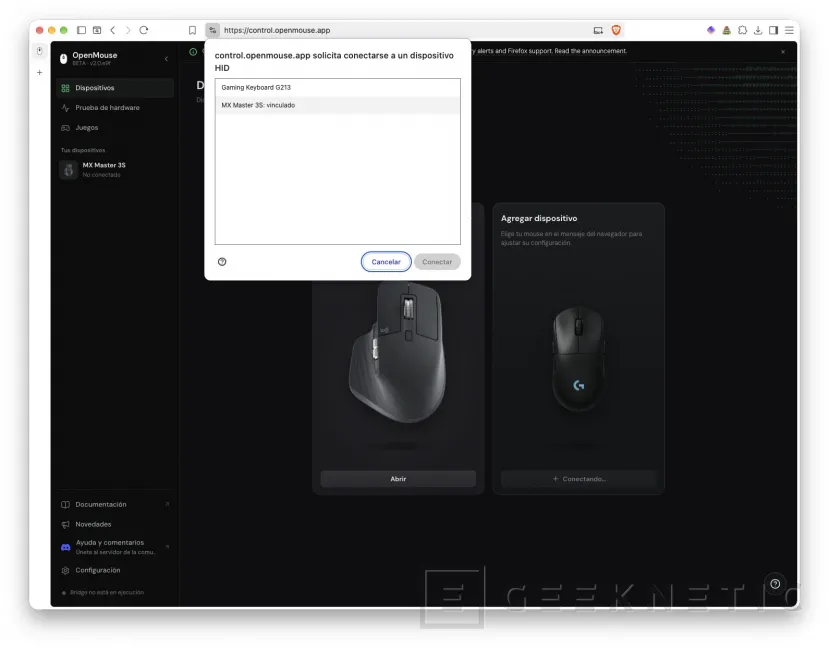
Then, simply enter the app and press Add device. This will cause the browser to detect the connected peripherals, as you can see in the image above. Then, simply access each device to configure it.
