
Windows 11 integrates the Internet speed test into Quick Settings and stops redirecting to Bing
A little over a year ago we told you that Microsoft was testing a speed test in the Windows 11 system tray. It is a function that finally arrived, but with an important limitation. What we mean is that the button was integrated into the taskbar, but the measurement was executed on the Bing website, to which Windows redirected the user through the browser.
Well, the company has changed that operation and now the test is run and shows its results directly on the Quick setupwithout leaving the desktop. The novelty is now available for Windows Insiders of the Experimental channel with the build 26340.9767.
This is how Microsoft describes it in the release notes:
- We’re making checking the performance of your Internet connection in Windows faster and easier. Windows Insiders can now run an Internet speed test and see the results directly in Quick Settings, without being redirected to a browser.
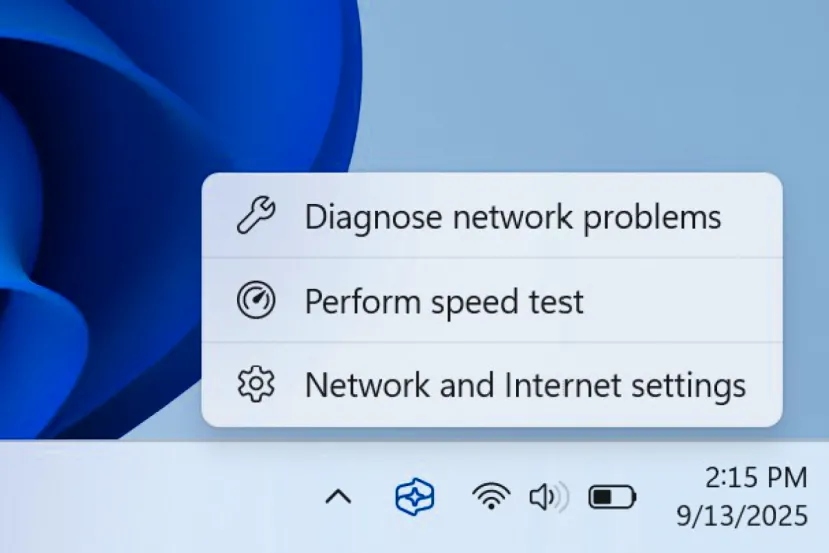
- Start a test from the new Speed Test quick setting, from the WiFi or Mobile Network drop-down menu, or by right-clicking the network icon in the system tray and selecting Test Internet Speed. While the test is running, Quick Settings shows your progress and results, including download speed, upload speed, and ping.
- Since the test runs over your active internet connection, you can quickly see how your current connection is performing without interrupting what you’re doing. This updated experience builds on the internet speed test we previously introduced for Windows Insiders, and brings the test and its results directly to Windows.
In addition to these notes, the company has shared images of the meter, which sports a completely native look.
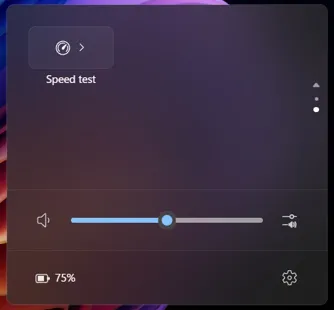
Likewise, we have also been able to see how the setting is integrated into the Windows 11 quick access panel, which is in the system tray.
Ookla’s Speedtest is still behind the measurement
What Microsoft doesn’t mention in its notes is who provides the service. As verified Windows Centralthe tool itself includes a notice indicating that it works with Speedtest technology, and the accompanying link leads to the privacy policy of Ookla, the company responsible for that platform. That is, the measurement is still in the hands of the same provider as the previous version. What changes is that it is no longer necessary to open Bing in Microsoft Edge to see the data.
If you have build 26340.9767 or later and the option does not appear, you can enable it manually. Just go to Settings > Windows Update > Windows Insider Program > Feature flags, mark the option as activated Quick Settings Speed Test and restart the computer. Remember that this section is the one that eliminates the need to use third-party tools such as ViVeTool.
